Authorization webhook
The authorization webhook service will send a notification in real time for all received authorizations. This is only meant to provide the partner/merchant with better reporting capabilities. Do not take any actions with regard of sales from these webhooks.
Setup
Please contact a Rapyd implementation specialist if you would like to register to receive authorization webhooks.
What Rapyd will provide:
- An API key that will need to be validated on the merchant/partner side when receiving the http webhook request.
- Retries if the merchant API is down or returning server errors (e.g. HTTP 500 - Internal server error)
What the merchant/partner will need to provide:
- Set up an API that is ready to receive the http payload below.
- Validate the http header variable "X-API-KEY".
- The API must accept all received authorizations and not do any validation.
- Always return HTTP 2xx unless there is a server error (e.g. HTTP 500 - Internal server error).
Considerations
- If a partner is only interested in certain subset of authorizations, they must do the filtering on their end as Rapyd will push all authorizations belonging to the merchant/partner.
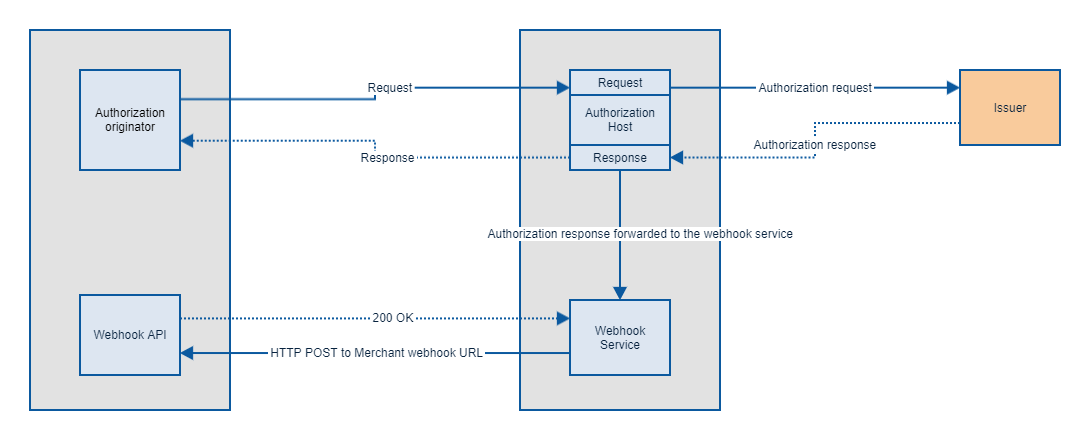
- If the authorization originates from a POS device or is processed by a processing system, the webhook can arrive before the response is returned to POS device or processing system.
- There is a possibility that the authorization is never finalized, therefore a webhook request can be received without the request ever arriving at the POS.
- Parameter Definitions: For detailed descriptions of all webhook parameters, including data formats and usage conditions, see the Parameters documentation.
Flow diagram
HTTP Request example
An example of how a request from Rapyd webhook service.
HTTP Header variable
Payload{
"requestParameters": {
"MsgType": "0100",
"MsgID": "117202",
"MsgUTC": "0507161856",
"MerchantXID": "000004300000000",
"MerchantType": "5999",
"TerminalID": "00000001",
"CardType": "V",
"CardNumber": "401200xxxxxx1112",
"TransType": "10",
"TransAmount": "2",
"TransCurrency": "352",
"TransTime": "161856",
"TransDate": "0507",
"CardExpDate": "2712",
"AdditionalData": "080610117Visa Traditional 0202US0303USD0406Credit0513Super Premium"
},
"responseParameters": {
"AuthorizationIdentifier": "656185da-ce21-11ec-b68e-e50734b75a4e",
"MsgType": "0110",
"MsgUTC": "0507161856",
"MsgID": "117202",
"ResponseCode": "00",
"ResponseSource": "I",
"MerchantXID": "000004300000000",
"TerminalID": "00000001",
"CardNumber": "401200xxxxxx1112",
"TransAmount": "2",
"TransCurrency": "352",
"TransType": "10",
"TransID": "212716117202",
"AuthCode": "671886",
"TransLCID": "000000191494053",
"PaymentAccountReference": "V0010013018036782991622965076",
"ProductId": "A",
"ProductIdDescription": "Visa Traditional",
"IssuerIdentifier": "1234567",
"IssuingCountry": "USA",
"IssuerRegion": "1",
"CardholderBillingCurrency": "USD"
"CardUsage": "C",
"CardCategory": "1",
"FundsDisbursementEnabled": "Y",
"FundsDisbursementOnlineGamblingEnabled": "N",
"FasterFunds": "Y",
"MoneyTransfer": "Y",
"AccountRangeLow": "40120000000000000000",
"AccountRangeHigh": "40120099999999999999"
}
}